
🚀 Introduction
Profiler Powered by Scalene is a VSCode/Cursor extension that brings the power of Scalene - an AI-powered CPU, GPU, and memory profiler for Python - directly into your editor. If you’ve been looking for a professional-grade Python profiling solution that works seamlessly in Cursor, VSCodium, or other VS Code alternatives, this extension is for you.
🤔 Why I Built This Extension
As a Python developer using Cursor for my daily work, I encountered a frustrating limitation: the original Scalene VS Code Extension by Emery Berger is excellent, but it’s not available on Open VSX, which is the extension marketplace used by Cursor, VSCodium, and other open-source VS Code alternatives.
The Problem
Python developers using Cursor and similar editors faced these challenges:
❌ No official Scalene extension available on Open VSX
❌ Limited profile visualization without switching to browser
❌ Memory leak detection only visible in CLI output
❌ No integrated source code view alongside metrics
❌ Missing support for modern Python tools like uv
The Solution
Profiler Powered by Scalene solves these issues while adding significant enhancements:
✅ Available on Open VSX for Cursor, VSCodium, and alternatives
✅ Built-in profile viewer with Rosé Pine Dawn theme
✅ Source code displayed for each profiled line
✅ Dedicated memory leak detection UI with code
✅ Full support for uv and pyproject.toml
✅ Function profiles and complete metrics view
✨ Key Features
🔥 Comprehensive Profiling
The extension provides line-level profiling with detailed metrics:
CPU Profiling: Track CPU usage with Python vs native code breakdown
Memory Profiling: Monitor allocations, peak usage, and copy operations per line
GPU Profiling: Identify GPU-accelerated code performance
Memory Leak Detection: Automatically identifies potential leaks with source code
📊 Built-in Profile Viewer
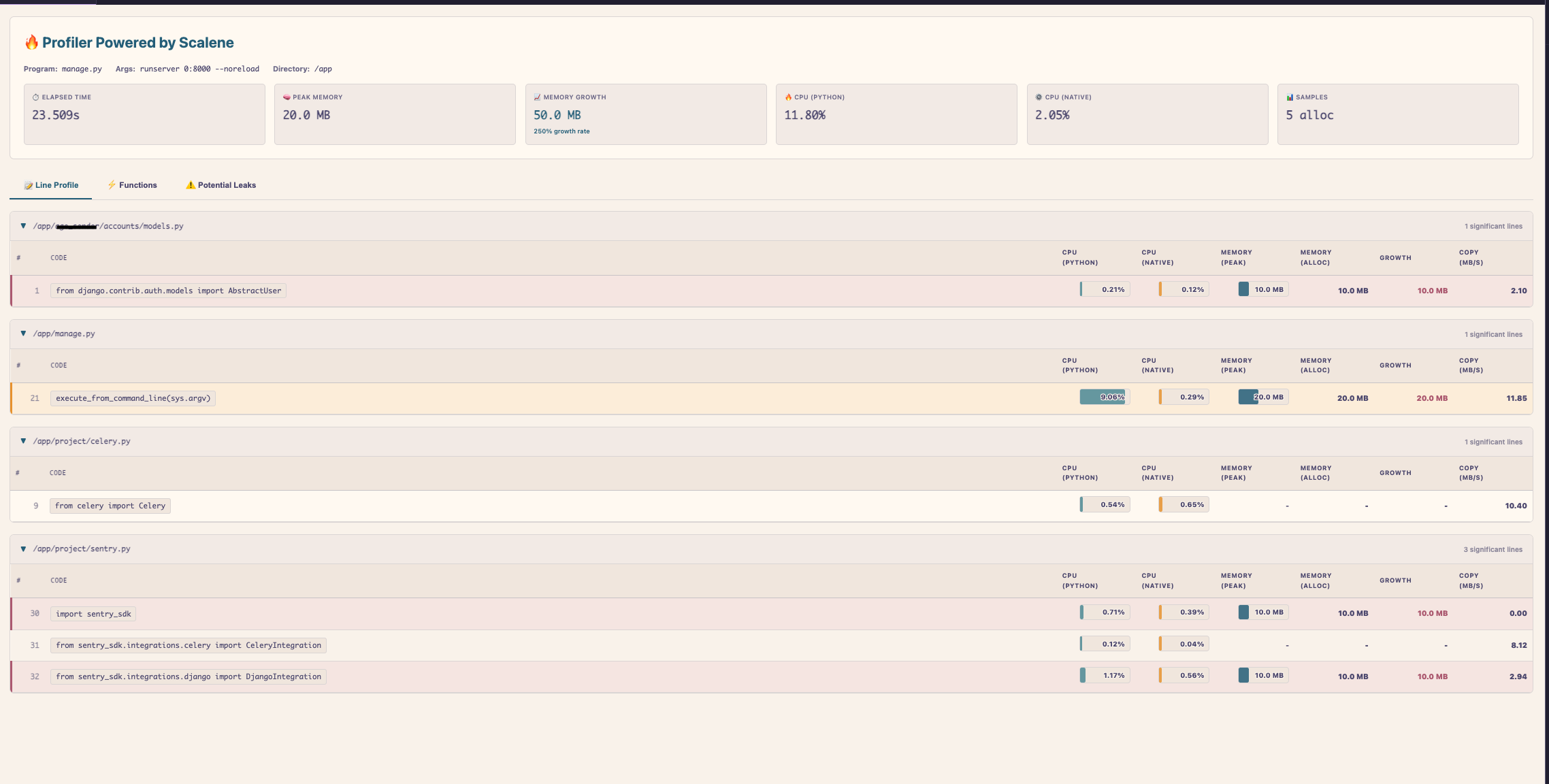
A beautiful integrated viewer using the Rosé Pine Dawn theme with four tabs:
Line Profile: Shows source code with all metrics (CPU Python/Native, Memory Avg/Peak, Copy rate, Growth)
Functions: Function-level CPU and memory breakdown
Potential Leaks: Dedicated tab showing leaking code with leak scores
About: Complete metrics guide and color coding reference
⚡ Enhanced Features vs Original
What makes this extension different from the original Scalene VS Code extension:
🌐 Open VSX Support: Works in Cursor, VSCodium, and all VS Code alternatives
📝 Source Code Display: See the actual code for each profiled line
🚨 Memory Leak UI: Dedicated interface showing potential leaks with source code
⚡ Function Profiles: Dedicated view for function-level analysis
🔧 uv Support: Auto-detects and uses uv for faster installation
📊 Complete Metrics: All Scalene metrics in one view
🎯 Profile Selected Code: Profile just a selected region
📍 Status Bar Integration: Quick access from the status bar
🎯 How to Use
Profile Your Code
Multiple ways to start profiling:
- Status Bar: Click the 🔥 Profiler button
- Context Menu: Right-click in editor → “Profiler: Profile Current File”
- Command Palette:
Ctrl+Shift+P→ “Profiler: Profile Current File”
Available Commands
# Profile entire file
Profiler: Profile Current File

# Focus on memory profiling
Profiler: Profile Memory Only

# Profile selected code region
Profiler: Profile Selected Code

# View last profile
Profiler: View Last Profile

# Open in browser
Profiler: Open in Scalene Web Viewer
Understanding the Results
The built-in viewer shows comprehensive metrics for each line:
CPU (Python): Time spent in Python code (optimize hot paths)
CPU (Native): Time in C/C++ libraries (check DB calls, numpy operations)
Memory (Avg MB): Average memory allocated (identify heavy allocators)
Memory (Peak MB): Peak memory usage (find memory spikes)
Copy (MB/s): Memory copy rate (high values indicate inefficient copying)
Growth (MB): Memory growth (positive values may indicate leaks)
⚙️ Configuration
The extension offers several customization options:
profilerScalene.pythonPath
Type: string | Default: Auto-detect
Python interpreter path. Automatically detected from VS Code Python extension.
profilerScalene.cpuSamplingRate
Type: number | Default: 0.01
CPU sampling rate in seconds. Lower values provide more detail but increase overhead.
profilerScalene.reducedProfile
Type: boolean | Default: true
Only show lines with significant CPU or memory usage.
profilerScalene.outputDirectory
Type: string | Default: .scalene-profiles
Directory for storing profile output files.
profilerScalene.autoOpenViewer
Type: boolean | Default: true
Automatically open the profile viewer after profiling completes.
profilerScalene.showMemoryLeaks
Type: boolean | Default: true
Show the potential memory leaks tab in the viewer.
Example Configuration
{
  "profilerScalene.cpuSamplingRate": 0.005,
  "profilerScalene.reducedProfile": false,
  "profilerScalene.autoOpenViewer": true,
  "profilerScalene.showMemoryLeaks": true
}
🐍 Profiling Django Applications
The extension works great with Django projects. Here are several approaches:
Method 1: Test Client Script (Recommended)
# profile_api.py
import os, django
os.environ.setdefault('DJANGO_SETTINGS_MODULE', 'myproject.settings')
django.setup()

from django.test import Client
client = Client()

for i in range(100):
    response = client.get('/api/users/')
    print(f"✓ {i}: {response.status_code}")
Run Profiler: Profile Current File on this script.
Method 2: Profile runserver
scalene run -o profile.json manage.py -- runserver 0:8000 --noreload
# Make requests, then Ctrl+C
# In Cursor: Profiler: View Last Profile
⚠️ Always use --noreload to prevent auto-reloader issues.
Method 3: Profile Specific View
# profile_view.py
import os, django
os.environ.setdefault('DJANGO_SETTINGS_MODULE', 'myproject.settings')
django.setup()

from myapp.views import expensive_view
from django.test import RequestFactory

for i in range(50):
    request = RequestFactory().get('/my-url/')
    response = expensive_view(request)
What to Look For in Django
When profiling Django applications, watch for these patterns:
Memory Leak: Growth > 0, Growth Rate > 110% → Check cached querysets, signal handlers
Slow Views: High CPU (Python) → Optimize serializers, templates, business logic
Database Issues: High CPU (Native) → Use select_related(), prefetch_related(), check N+1 queries
Memory Usage: High Peak MB → Use .iterator(), pagination, streaming responses
💡 Best Practices
When profiling Python applications:
🎯 Profile realistic workloads (not empty databases or toy data)
🔍 Use Profile Memory Only for focused memory leak detection
📊 Profile 50-100 iterations for reliable statistical data
⚡ Check both CPU and memory metrics for complete picture
🔧 Use uv for faster Scalene installation and updates
📝 Pay attention to Growth column for memory leaks
📦 Installation
From Open VSX (Cursor/VSCodium)
- Open Cursor or VSCodium
- Go to Extensions view (
Ctrl+Shift+X/Cmd+Shift+X) - Search for “Profiler Powered by Scalene”
- Click Install
Or use the command:
ext install WaYdotNET.profiler-powered-by-scalene
From VSIX
Download the .vsix file from GitHub Releases and install via Command Palette → “Install from VSIX”.
🔧 Requirements
Python: 3.8 or higher
Scalene: Automatically installed if missing (with uv or pip)
Optional: uv for faster installation when pyproject.toml exists
🎨 Design Philosophy
The extension is built with several principles in mind:
Open Source First: Available on Open VSX for the entire community
Accessibility: Uses Rosé Pine Dawn theme (WCAG AAA compliant)
Developer Experience: Everything visible in one place, no context switching
Modern Python: First-class support for uv and modern Python tooling
Type Safety: Written in TypeScript with strict mode enabled
🚀 Future Improvements
Planned enhancements for future releases:
🔍 Historical profile comparisons
📊 Performance regression detection
🏷️ Custom metric filtering and sorting
🔀 Export to various formats (CSV, JSON, PDF)
⚡ Profile diffing between runs
📢 Conclusion
Profiler Powered by Scalene brings professional-grade Python profiling to Cursor and other VS Code alternatives, filling a crucial gap in the ecosystem while adding significant enhancements over the original extension.
Whether you’re optimizing hot paths, tracking down memory leaks, or understanding your application’s performance characteristics, this extension makes profiling accessible and actionable.
✨ Available on Open VSX for Cursor and alternatives
✨ Built-in viewer with source code and all metrics
✨ Memory leak detection with dedicated UI
✨ Modern Python tooling support (uv, pyproject.toml)
The extension is open-source and available on Open VSX Registry and VS Code Marketplace.
📌 GitHub repository: WaYdotNET/profiler-powered-by-scalene
🙏 Credits
This extension was inspired by the excellent Scalene VS Code Extension by Emery Berger. Scalene itself is a groundbreaking project by Emery Berger, Sam Stern, and Juan Altmayer Pizzorno.
The goal of this extension is to make Scalene accessible to the Cursor and VSCodium communities while adding features that enhance the profiling workflow.
Feedback and contributions are welcome! 🚀
📬 Stay Updated
Follow me on GitHub and check out my website for more projects and updates!
Have you tried the extension? Let me know your experience with Python profiling!